
Built by a private chef, for private chefs
Plan the whole week in minutes, not a whole Sunday
- ✓Every dish checked against each client's never-use list
- ✓Snap a photo of a menu and get recipes and a priced grocery list
- ✓Clients approve menus and pay by card from their phone
14 days of everything free · Set up in 2 minutes · Cancel any time

Made by Chef Matt, a private chef and NBA performance chef who runs his own clients on SavorDesk every week.
Still doing it all by hand?
✕Rebuilding the grocery list every week
→✓One list for every client, merged and sorted by aisle
✕Scrolling old texts for who's allergic to what
→✓Every household's allergies and never-use list, checked on every dish
✕Chasing menu approvals
→✓Clients approve or ask for swaps with one tap
✕Typing up invoices and sending payment links
→✓Invoices fill themselves in. Clients pay by card
See it in action
One real week, start to finish. Tap any part to jump to it.
The client portal
What your clients see
No more menus over text and payments over Venmo. Clients get a polished portal on their phone – with your name and logo on it, not ours.
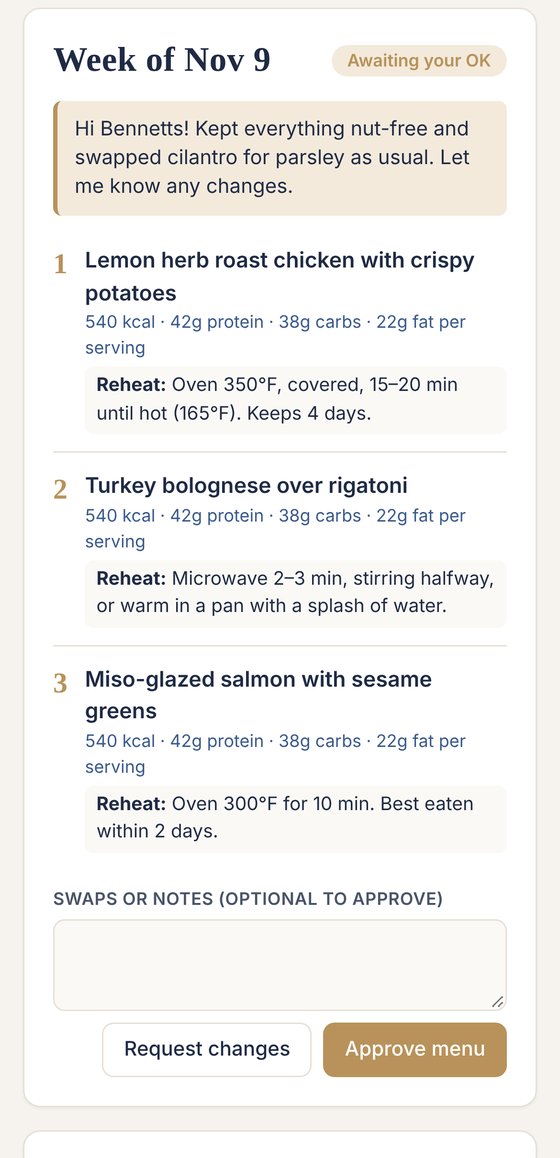
Approve in one tap
Clients see the week's menu with nutrition and reheating notes, then approve or ask for swaps.
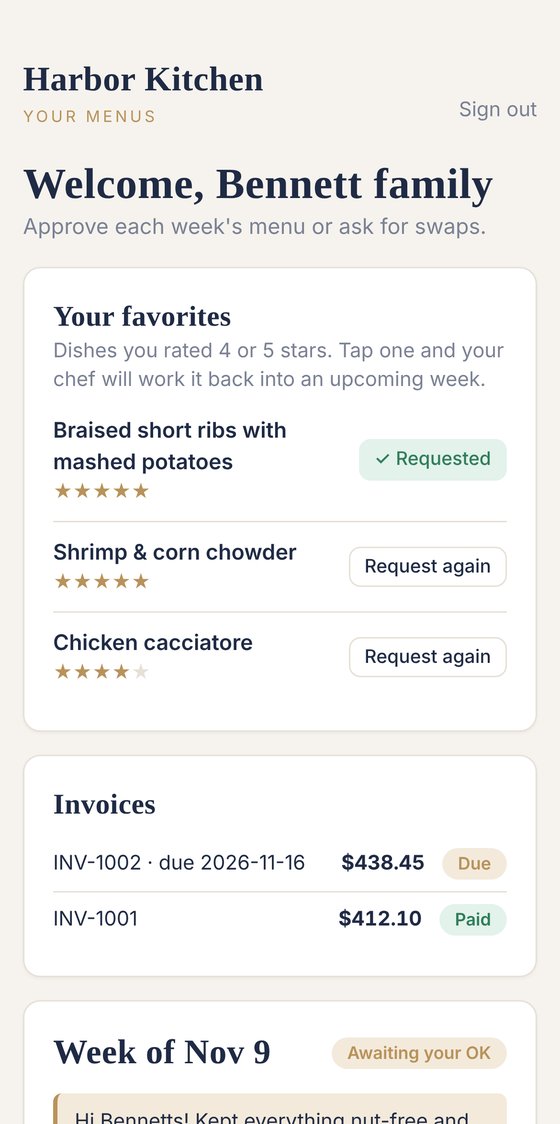
Favorites on repeat
Every 4- and 5-star dish is one tap from coming back – and you see the request in your menu editor.
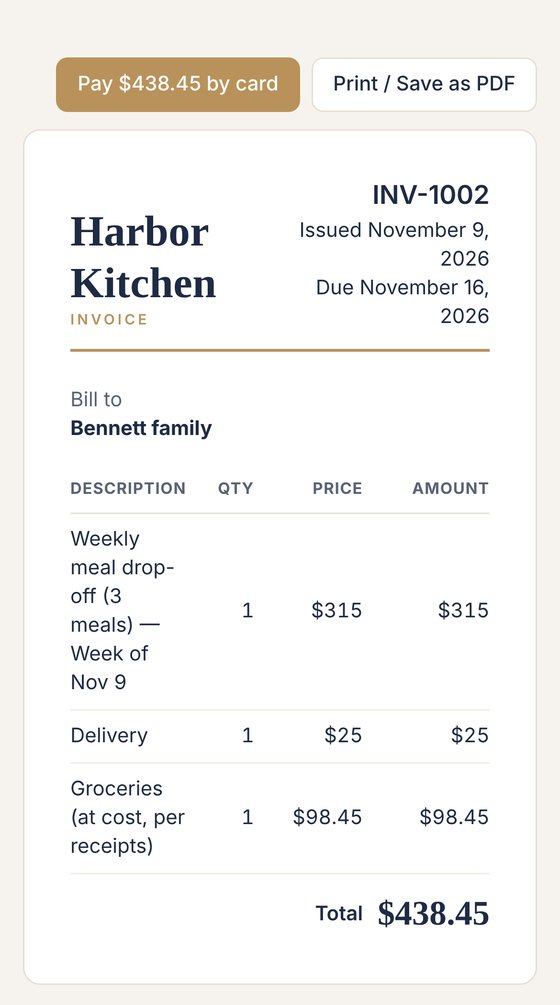
Paid by card
Invoices fill themselves in and clients pay online. The money lands in your own Stripe account.
Sample chef and client shown.
✦ AI assistant
Type a dish. Get the whole job done.
You stay in charge of every menu – the assistant just does the data entry. Here's one dish, start to finish:
Ingredients
- 2 lb boneless chicken thighs
- 1½ lb baby potatoes
- 1 lb green beans
- 2 lemons · 4 garlic cloves
- Olive oil, thyme, rosemary
Grocery list
- Merged with the rest of the week
- Sorted by aisle
- Pantry staples skipped
Cost estimate
- ≈ $21 for the dish
- ≈ $5.25 per serving
Nutrition estimate
- ≈ 525 kcal per serving
- ≈ 44 g protein
Example output. Nutrition and cost figures are estimates – review and edit any ingredient, amount or price before it goes to a client.
Paste or snap a menu. Upload a photo or paste last week's menu and it becomes a structured menu with ingredients.
Swaps that respect the rules. Ask for a dairy-free or gluten-free version and it works around each client's never-use list.
Import your client list. Paste a spreadsheet or notes and it sets up every client profile for you.
Everything you need to run your business
Starter covers the essentials. Pro adds the automation that saves hours every week. Every trial includes everything.
The kitchen
Plan & cook
- ✓Client profiles
- ✓Menus with an allergy guard
- ✓Recipe libraryPro
- ✓Grocery lists that build themselves
- ✓Nutrition + grocery costsPro
- ✓Reheating instructions
- ✓Cook-day recap sheets
- ✓Container labels
Bookings
Win clients
- ✓Inquiry page
- ✓Client intake form
- ✓Proposals in a minutePro
- ✓Contracts with e-signaturePro
- ✓Order page for catering + baked goodsPro
- ✓Your brand on everythingPro
Money
Get paid
- ✓Invoices that fill themselves in
- ✓Automatic weekly invoicesPro
- ✓Card + Apple Pay payments
- ✓Auto-payPro
- ✓Receipts on invoices
- ✓Finances at a glancePro
- ✓Automatic remindersPro
Relationships
Keep clients happy
- ✓Client portal – no passwords
- ✓Favorites on repeatPro
- ✓Emails that send themselvesPro
- ✓Taste historyPro
- ✓Calendar
- ✓Team seatsStudio
- ✓Help when you need it
Switch in an afternoon
No retyping your whole business. Bring what you already have and SavorDesk's AI assistant does the data entry.
Import your clients
Paste a spreadsheet, a notes page or a text thread. The AI assistant builds every profile – diets, allergies, prices.
Bring your menus
Paste or photograph last week's menus and they become real menus with ingredients and grocery lists.
Invite your clients
One tap emails each family a sign-in link. No passwords, no app to download.
Made in a real kitchen
SavorDesk was built by a private chef and NBA performance chef who cooks for families every week. Every feature exists because it saved time on an actual cook day.
Read the storySimple pricing
Every account starts with a 14-day free trial of everything. Annual plans get two months free.
Starter
The essentials for a new chef
or $190/year
- ✓Up to 5 active clients
- ✓Menus with allergy check + client portal
- ✓Grocery lists + recap sheets
- ✓Invoices + card payments
- ✓Inquiry page
- ✓AI assistant (20 uses a month)
Pro
Most popularAutomation for a busy weekly roster
or $390/year
- ✓Up to 25 active clients
- Everything in Starter, plus:
- ✓Automatic emails, reminders + weekly invoices
- ✓Proposals + contracts with e-signature
- ✓Order page for catering + baked goods
- ✓Nutrition, grocery costs + finances
- ✓Favorites, taste history + recipe library
- ✓Your logo on everything, with no SavorDesk branding
- ✓Unlimited AI assistant
Studio
For growing teams
or $790/year
- ✓Unlimited clients
- Everything in Pro, plus:
- ✓Team seats for sous chefs + assistants
- ✓Priority support
Questions
Do my clients need an account?+
No passwords. Clients sign in to their portal with a one-tap email link. Invoices, contracts and order pages open straight from a link.
How do card payments work?+
You connect your own Stripe account in Settings. Clients pay invoices online, and payments land in your account. Stripe's standard card fees apply; SavorDesk takes no cut.
Can I bring my existing clients?+
Yes. Paste your client list or notes and the AI assistant sets up the profiles for you.
What's the difference between Starter and Pro?+
Starter has what you need to plan menus, shop, get approvals and get paid by card for up to 5 clients. Pro adds automatic emails, reminders and weekly invoices, proposals and contracts, the order page, nutrition and grocery costs, finances, favorites and the recipe library, your own logo and colors, and unlimited use of the AI assistant – for up to 25 clients.
Why does SavorDesk price the groceries?+
So you can plan around a budget. Many clients have a weekly grocery range in mind. You see the estimated total for each client's week before you shop, and can swap a dish or adjust portions to stay within their range, with no surprises on the invoice.
Are the nutrition and cost numbers exact?+
They're estimates, worked out from the ingredients and typical package prices. You can review and edit every ingredient, amount and price before anything goes to a client.
What happens after the free trial?+
Your trial includes everything. Pick a plan to keep going – your data stays put. Cancel any time from the Billing page.
Run your food business. Not the paperwork.
14 days of everything · Set up in 2 minutes